👇👇Try it here 👇👇


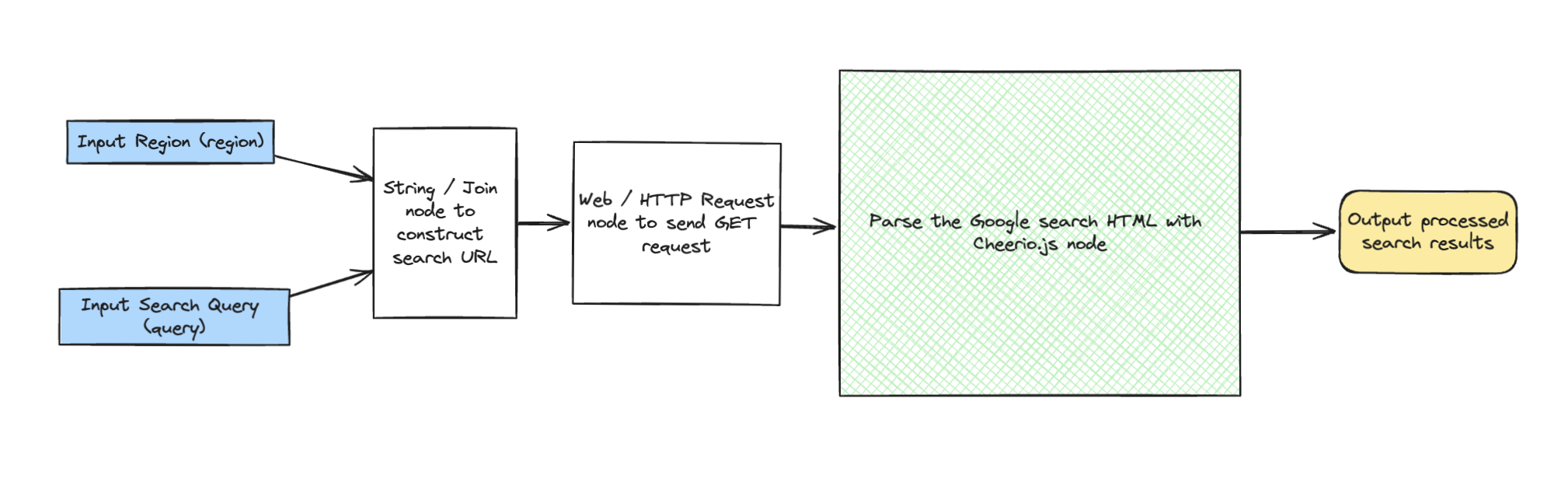
Yes, we know that you can just do a search Google to get a Google search result. We just wanted to showcase how, using NodeScript, you can automate the gathering and manipulation of data and then add the functionality to your project with a single endpoint.
The "Search Google" graph is designed to streamline the process of fetching and parsing Google search results based on user-defined queries. The graph takes a good query and a region to search in and provides the result directly.
Our graph uses several custom nodes to handle different stages of the process, from setting up the query to extracting and outputting information. Let's take a look at how it works:
Step-by-Step Breakdown:
query) and a region (region), such as "NodeScript" and "UK".String / Join node concatenates the base Google search URL with the query and region parameters to form a complete search URL.Web / Http Request node sends a GET request to the constructed URL to retrieve the HTML content of the search results page.Parse the Google search HTML with Cheerio.js node uses the Cheerio library to parse the HTML and extract search results. It iterates through the results, extracts the title, description, and URL, and returns a filtered array of search results.Output node captures the processed search results, which can then be utilized or displayed as needed.
This graph is just a cool example of how you can simplify Google searching into a bespoke result and then use the endpoint as a function in the real world. Hopefully it gives you a little taste of some of the things we want you to build with the tool set!