Example
5 min read

Create Regex with NodeScript‍‍

May 3, 2024
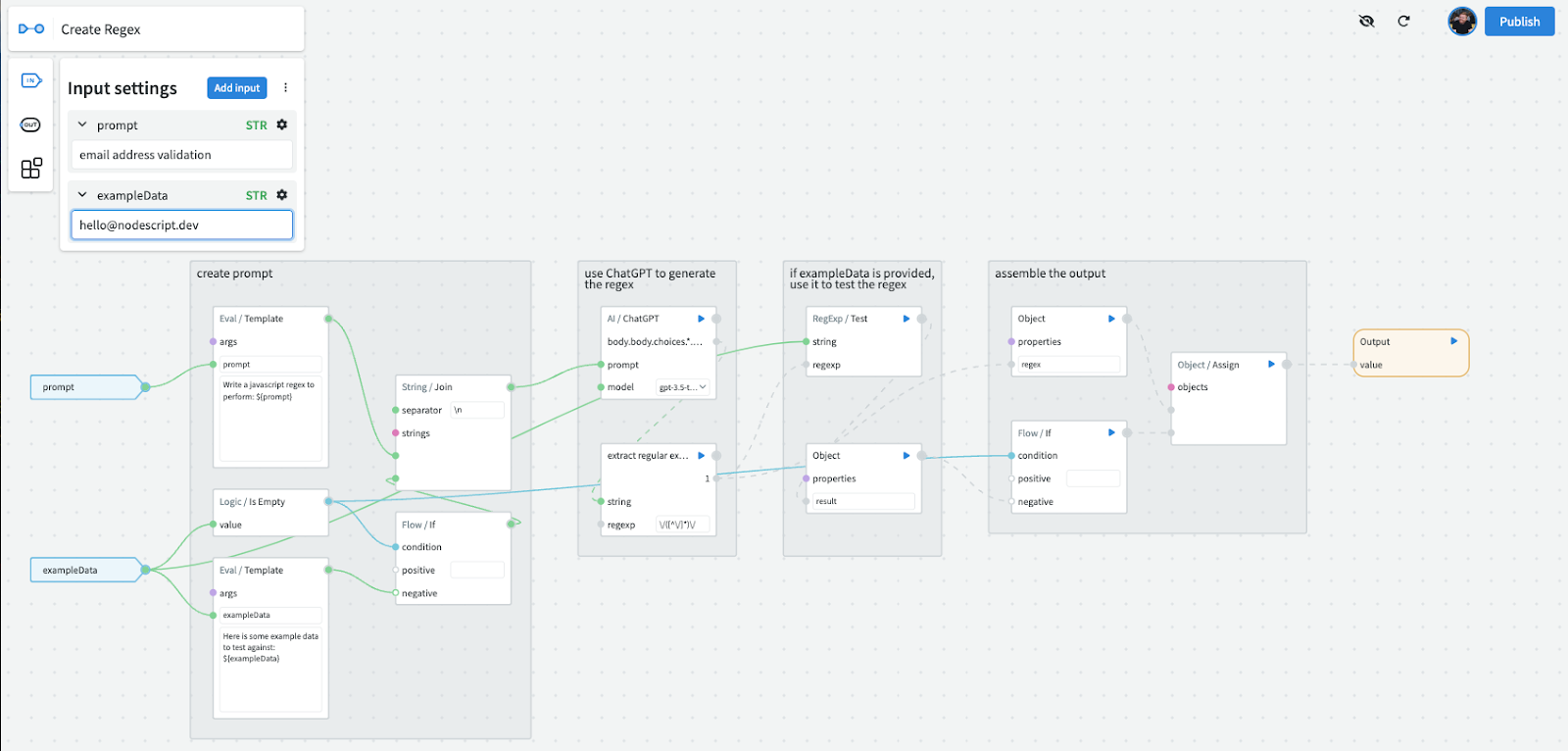
Today we want to take a look at our "Create Regex" graph. It's an excellent example of how to use NodeScript to simplify complex tasks, in this case creating and testing regular expressions. The graph takes inputs and uses AI assistance to automate the creation of regex patterns tailored to specific needs. Here’s a closer look:

Input Settings:

  1. Prompt: Specify the type of regex you need to generate. In this example, the prompt is set for "email address validation," indicating the regex should validate email addresses.
  2. Example Data: To test the effectiveness of the generated regex, users can input example data. Here, "hello@nodescript.dev" serves as our sample email address to test against the regex pattern created by the graph.


How the graph works:

  1. Create Prompt Collection: Structure the user input into a clear query and dynamically construct a prompt to guide regex generation.
  2. Regex Generation via AI: Use AI (ChatGPT) to interpret the prompt and generate a suitable regex pattern.
  3. Regex Testing: Validate the generated regex against provided example data, ensuring it matches the expected format and providing immediate feedback.
  4. Output Assembly: Organize and summarize the regex pattern and its test results, making it ready for deployment in various scenarios.

Some use cases for this graph:

  • Form Data Validation: Automate regex creation for real-time validation of user inputs in web forms, such as emails and phone numbers.
  • Data Extraction in ETL Pipelines: Utilize generated regex patterns to parse and structure raw data during ETL processes, ensuring data integrity and usability.
  • Content Moderation: Develop patterns to filter and moderate content dynamically across platforms, enhancing automation in content management systems.

We used NodeScript here to both simplify an otherwise complex task and make an effective workflow. One of the cool things about NodeScript is you can Publish this graph and use it as a module in another graph,  the entire functionality of this graph, as a single node in any future project.

This graph is a great example of implementing AI into a workflow to enhance the functionality of NodeScript. We have provided some standard library ChatGPT modules for you to use at launch, or you can have a go at building your own. Have fun!

👇👇Try it here 👇👇